You can search and retrieve logs using getsearchlogs. Its two mandatory parameters are username and secret_key. They are required for Authorization and Authentication.
While the following endpoints use the POST method, they function as GET.
Parameter |
Value Type |
Description |
|---|---|---|
query |
String |
A valid search query in Logpoint. |
time_range |
String |
Default search time range of Logpoint. |
Repo |
Array/List |
The repository where the logs are stored. |
client_name |
String |
Interface of the search request. The default value is ‘UI’. |
timeout |
Integer |
Waiting time (in seconds) for a request before canceling it. |
search_id |
String |
Used to get logs of a search query. You receive it from the server only after the successful completion of a search request. |
Limit |
Integer |
The maximum amount of search results to return in the final response. Only applicable in case of simple search queries and not in case of aggregation queries. |
To get search results using Logpoint Search API, perform a search request with all required parameters. A successful request responds with a search_id, which can be used as a request parameter to receive logs resulting from the search query request.
Perform a query-based search on requested repos for a limited number of logs within a defined time range. This API action responds with a search_id on successful completion.
POST
https://Logpoint-IP/getsearchlogs
Parameter |
Value Type |
Description |
|---|---|---|
username |
String |
Logpoint username |
secret_key |
String |
Access key to uniquely identify an authorized user. Go to Finding the Access Key for information on retrieving it. |
requestData |
JSON Object |
A list of JSON objects containing the following parameters:
|
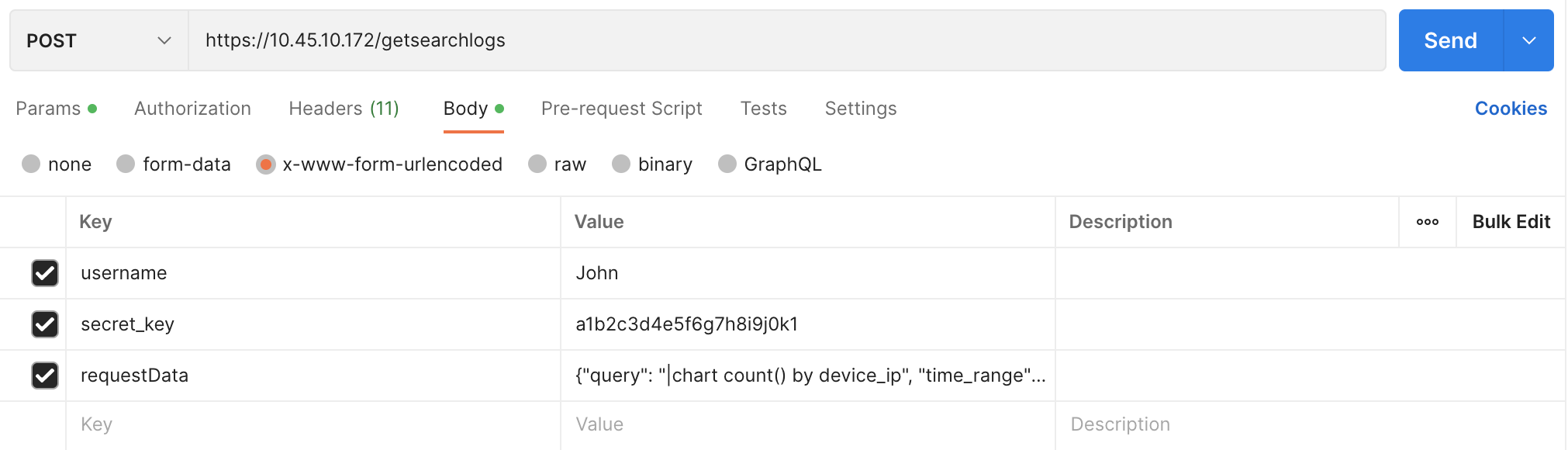
Parameters are data sent along with the request to retrieve information. It should be included in the request body as x-www-form-urlencoded. Content-Type, Content-Length, and Host must be passed in the request header. Content-Type should be application/x-www-form-urlencoded.
{
        "username" : "John",
        "secret_key" : "a1b2c3d4e5f6g7h8i9j0k1",
        "requestData": {
                "query": "|chart count() by device_ip",
                "time_range": "Last 24 hours",
                "limit": 100,
                "repos": ["127.0.0.1:5504/_Logpoint"]
                        }
        }
curl --location 'https://10.45.10.172/getsearchlogs' \
--header 'Content-Type: application/x-www-form-urlencoded' \
--data-urlencode 'username=John' \
--data-urlencode 'secret_key=a1b2c3d4e5f6g7h8i9j0k1' \
--data-urlencode 'requestData={"query": "|chart count() by device_ip", "time_range": "Last 24 hours", "limit": 100, "repos": ["127.0.0.1:5504/_logpoint"]}'
        {
"search_id": "23b4a5fd-d419-4831-bcf5-e6846857fb64",  # unique ID generated on each search.
"client_type": "UI",
"query_filter": "",
"latest": false,
"lookup": false,
"query_type": "chart",
"time_range": [
        1582023872,
        1582110272
        ],
"searchId": "23b4a5fd-d419-4831-bcf5-e6846857fb64",
"clientType": "UI",
"success": true
        }
Response Parameters |
Value Type |
Description |
|---|---|---|
search_id |
String |
A unique identifier generated for each search request. |
client_type |
String |
Type of client that initiated the request. |
query_filter |
String |
Specifies any filters applied to the query. |
latest |
Boolean |
Returns True if the search fetches the latest logs; otherwise, it returns False. |
lookup |
Boolean |
Returns True if the search includes a lookup operation; otherwise, it returns False. |
query_type |
String |
Defines the type of query executed (Example: chart). |
time_range |
Array of integers |
Contains two timestamps that define the start and end of the search time range. |
success |
Boolean |
Returns True if the API call is successful; otherwise it returns False. |
Retrieve search result logs based on the search_id. The server sends the search result logs in chunks. You need to continue sending the request with the same parameters until you receive a response where final is equal to TRUE. It indicates that you have received all the search result logs.
POST
https://Logpoint-IP/getsearchlogs
Parameter |
Value Type |
Description |
|---|---|---|
username |
String |
Logpoint username |
secret_key |
String |
Access key to uniquely identify an authorized user. Go to Finding the Access Key for information on retrieving it. |
requestData |
JSON Object |
A JSON object containing a unique search_id. |
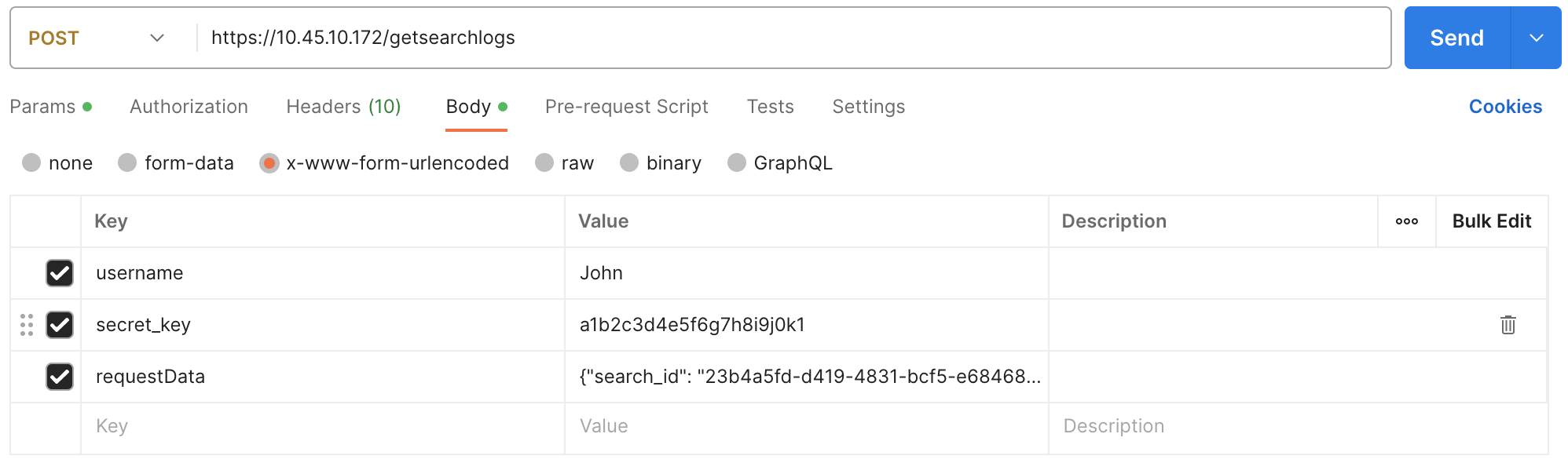
Parameters are data sent along with the request to retrieve information. It should be included in the request body as x-www-form-urlencoded.
{
        "username" : "John",
        "secret_key" : "a1b2c3d4e5f6g7h8i9j0k1",
        "requestData": {
                "search_id": "23b4a5fd-d419-4831-bcf5-e6846857fb64",
                }

}
curl --location 'https://10.45.10.172/getsearchlogs' \
--header 'Content-Type: application/x-www-form-urlencoded' \
--data-urlencode 'username=John' \
--data-urlencode 'secret_key=a1b2c3d4e5f6g7h8i9j0k1' \
--data-urlencode 'requestData={"search_id": "23b4a5fd-d419-4831-bcf5-e6846857fb64"}'
{
"num_aggregated": 12345,
"columns": [
        "count()"
        ],
"query_type": "chart",
"rows": [
        {
                "device_ip": "::1",
                ....
                ....
        },
        {
                "device_ip": "127.0.0.1",
                ....
                ....
        }
        ],
"grouping": [
        "device_ip"
        ],
"version": 2,
"interesting_fields": [],
"time_range": [
        1582024214,
        1582110614
        ],
"orig_search_id": "23b4a5fd-d419-4831-bcf5-e6846857fb64",
"success": true,
"final": true,
"totalPages": 1,
"complete": true,
"showAdditionalPanels": true,
"status": {
        ....
        ....
        }
}
Response Parameters |
Value Type |
Description |
|---|---|---|
num_aggregated |
Integer |
The total number of logs aggregated in the result set. |
columns |
Array of strings |
Lists the columns returned by the query, such as count(). |
query_type |
String |
Defines the type of query executed (Example: chart). |
rows |
Array of objects |
Contains the actual search result logs. Each object represents a log entry with relevant fields (e.g., device_ip). |
grouping |
Array of strings |
Defines the fields used to group the search results (e.g., device_ip). |
version |
Integer |
Version of the search result format or API being used. |
interesting_fields |
Array of strings |
Lists any fields deemed interesting in the result set. |
time_range |
Array of integers |
Contains two timestamps that define the start and end of the search time range. |
orig_search_id |
String |
The original search_id used to initiate the search. |
final |
Boolean |
Returns True if all search result logs are retrieved; otherwise it returns False. |
success |
Boolean |
Returns True if the API call is successful; otherwise it returns False. |
totalPages |
Integer |
The total number of pages of results. |
complete |
Boolean |
Returns True the search is successful; otherwise it returns False. |
showAdditionalPanels |
Boolean |
Returns True additional visualizations should be displayed with the search result; otherwise it returns False. |
status |
object |
Additional status information about the search, such as progress or execution details. |